MACB Forensic Timestamp Reference
I put together a nice little post here detailing the behavior of MACB timestamps (Modified, Accessed, Changed, Birth) across various filesystems and common file operations. This is a great reference for digital forensics practitioners conducting timeline analysis. I focused on Windows NTFS, FAT32/exFAT, Linux ext4/XFS, and macOS APFS since these are the most common filesystems encountered in investigations for 2025.
Hopefully I got everything correct, but if you spot any mistakes or have additional info, please reach out! Especially if you have a good Table design. I am always unsure if I like the table designs for some reason.
Legend
MACB Attributes
| Attr | Name | Desc |
|---|---|---|
| M | Modified | Content last changed |
| A | Accessed | Last opened/read |
| C | Changed | Metadata/inode changed (POSIX) or MFT record changed (NTFS) |
| B | Birth | File creation time |
Color Key
| Indicator | Meaning | Forensic Significance |
|---|---|---|
| M Green | Updated | Operation timestamp marker |
| M Yellow | Inherited/preserved from source | Indicates copy with preservation |
| M Gray | Unchanged | Same-volume moves; original times retained |
| M Purple | Varies by policy/tool | Depends on registry, mount options, or flags |
| – Hyphen | Not supported/Not applicable | Filesystem limitation (e.g., no atime on APFS, no btime on XFS) |
Windows NTFS
⚠️ Forensic Alert
NTFS stores two sets of timestamps.$SIis user-modifiable;$FNrequires kernel access. Compare both to detect timestomping!
Timestamp Behavior (Separate $SI and $FN)
| Operation | $SI M | $SI A | $SI C | $SI B | $FN M | $FN A | $FN C | $FN B | Notes |
|---|---|---|---|---|---|---|---|---|---|
| Create new file | M | A | C | B | M | – | C | B | Both sets initialized; $FN A not maintained |
| Modify content (write) | M | A | C | B | M | – | C | B | $FN unchanged on content-only edits. Atime varies by policy. |
| Read/open (no write) | M | A | C | B | M | – | C | B | LastAccess disabled by default since Vista |
| Rename / Move (same volume) | M | A | C | B | M | – | C | B | Key forensic indicator: $FN updates but $SI doesn’t |
| Move (cross-volume) | M | A | C | B | M | – | C | B | Effectively copy+delete. New MFT entry. |
| Copy (same or cross volume) | M | A | C | B | M | – | C | B | New file created. Explorer preserves M. |
| Change attributes/ACL | M | A | C | B | M | – | C | B | Metadata-only change updates $SI C |
| Set times via API (SetFileTime) | M | A | C | B | M | – | C | B | Timestomping indicator: $SI set to arbitrary values; $FN unchanged |
Legend: G = Updated | Y = Inherited/preserved | P = Varies | Gray = Unchanged | – = Not supported
- One method to set time via API is using PowerShell:
powershell 7 lines
$path = "C:\path\to\file.txt"
$creationTime = Get-Date "2023-01-01 12:00:00"
$lastAccessTime = Get-Date "2023-01-02 12:00:00"
$lastWriteTime = Get-Date "2023-01-03 12:00:00"
[System.IO.File]::SetCreationTime($path, $creationTime)
[System.IO.File]::SetLastAccessTime($path, $lastAccessTime)
[System.IO.File]::SetLastWriteTime($path, $lastWriteTime)- A second method is using the
SetFileTimefunction in C/C++:
c 13 lines
#include <windows.h>
#include <stdio.h>
void SetFileTimes(const char* filePath, FILETIME* creationTime, FILETIME* lastAccessTime, FILETIME* lastWriteTime) {
    HANDLE hFile = CreateFileA(filePath, GENERIC_WRITE, 0, NULL, OPEN_EXISTING, FILE_ATTRIBUTE_NORMAL, NULL);
    if (hFile == INVALID_HANDLE_VALUE) {
        printf("Error opening file: %d\n", GetLastError());
        return;
    }
    if (!SetFileTime(hFile, creationTime, lastAccessTime, lastWriteTime)) {
        printf("Error setting file times: %d\n", GetLastError());
    }
    CloseHandle(hFile);
}
💡 Detection Tip: If
$SI B>$FN B, suspect timestomping–attackers can modify$SIbut rarely touch$FN.
Windows FAT32 / exFAT
Resolution: FAT32: M ~2s, B ~10ms, A = date only | exFAT: All ~10ms
| Operation | M | A | C | B | Notes |
|---|---|---|---|---|---|
| Create new | M | A | – | B | A = date-only on FAT32; full time on exFAT |
| Modify content | M | A | – | B | B unchanged; A may update |
| Read/open | M | A | – | B | Some tools suppress A updates |
| Rename/Move (same volume) | M | A | – | B | Directory entry updated only |
| Copy (same or cross volume) | M | A | – | B | M preserved; B set to now |
| Move (cross volume) | M | A | – | B | Copy+delete semantics |
Legend: G = Updated | Y = Inherited/preserved | P = Varies | Gray = Unchanged | – = Not supported
💡 USB Forensics: FAT32/exFAT timestamps are local time, not UTC–account for timezone when correlating!
Linux ext4
| Operation | M | A | C | B | Notes |
|---|---|---|---|---|---|
| Create new | M | A | C | B | All four timestamps initialized |
| Modify content | M | A | C | B | relatime: A updates if M newer or 24h passed |
| Read/open | M | A | C | B | relatime throttles; noatime disables |
| Rename/Move (same fs) | M | A | C | B | Inode metadata change updates C |
| Copy (cp default) | M | A | C | B | New inode; all timestamps = now |
| Move (cross fs) | M | A | C | B | mv preserves M from source |
| chmod/chown/xattr | M | A | C | B | Metadata-only operations update C |
Legend: G = Updated | Y = Inherited/preserved | P = Varies | Gray = Unchanged
💡 Note: C (ctime) cannot be set by user-space tools. This is useful for detecting evidence tampering.
Linux XFS
| Operation | M | A | C | B | Notes |
|---|---|---|---|---|---|
| Create new | M | A | C | – | No birth time stored in XFS |
| Modify content | M | A | C | – | relatime behavior same as ext4 |
| Read/open | M | A | C | – | A updates per mount options |
| Rename/Move (same fs) | M | A | C | – | Directory link change updates C |
| Copy (cp default) | M | A | C | – | New inode; M/A/C = now |
| Move (cross fs) | M | A | C | – | mv preserves M; new inode |
| chmod/chown/xattr | M | A | C | – | Metadata changes always update C |
Legend: G = Updated | Y = Inherited/preserved | P = Varies | Gray = Unchanged | – = Not supported
⚠️ Limitation: XFS does not support birth time–B column always N/A.
macOS APFS
| Operation | M | A | C | B | Notes |
|---|---|---|---|---|---|
| Create new | M | – | C | B | APFS does not maintain atime |
| Modify content | M | – | C | B | Data + metadata change |
| Read/open | M | – | C | B | No timestamp updates on read |
| Rename/Move (same volume) | M | – | C | B | Metadata change updates C only |
| Copy (Finder/cp) | M | – | C | B | Finder preserves M; B = copy time |
| Move (cross volume) | M | – | C | B | Copy+delete; M preserved, new B |
| chmod/chown/xattr | M | – | C | B | Metadata-only updates C |
Legend: G = Updated | Y = Inherited/preserved | P = Varies | Gray = Unchanged | – = Not supported
💡 Forensic Note: APFS lack of atime means file access patterns cannot be tracked via timestamps.
Windows NTFS: File Tunneling
⚠️ Forensic Alert: Tunneling can cause misleading timestamps in investigations!
NTFS maintains a “tunnel cache” that preserves metadata from deleted/renamed files. When a new file is created with the same name in the same directory within the tunnel window, it inherits the previous file’s Created (B) timestamp and short 8.3 filename.
The 8.3 filename for some who may not know is a legacy DOS-compatible short filename format (e.g.,
FILE~1.TXT). The character limit is 8 characters for the name and 3 for the extension. This was used in older Windows versions and applications that required short filenames.
How It Works
- Trigger: Delete or rename a file, then create a new file with the original name in the same directory.
- Window: Default ~15 seconds (configurable). The cache is keyed by directory + long filename.
- Effect: New file’s
$SIB (Created) timestamp is set to the deleted file’s B, not the actual creation time. - Short name: The 8.3 short filename is also inherited from the tunnel cache.
Registry Controls
Location: HKLM\SYSTEM\CurrentControlSet\Control\FileSystem
| Value Name | Type | Default | Description |
|---|---|---|---|
MaximumTunnelEntries | DWORD | 1024 | Max entries in tunnel cache. Set to 0 to disable. |
MaximumTunnelEntryAgeInSeconds | DWORD | 15 | Seconds before tunnel entry expires. |
Forensic Implications
- False timeline: A malicious file created today may show a B timestamp from weeks ago if it replaced a legitimate file quickly.
- Detection: Compare
$SIB vs$FNB. If$FNB is recent but$SIB is old, tunneling may have occurred. - MFT analysis: The MFT entry sequence number and
$LogFilecan reveal the true creation time. - Common scenario: “Save As” operations that overwrite, or malware replacing system files.
💡 Tip: When
$SIB predates$FNB by more than 15 seconds, tunneling is unlikely–investigate for timestomping instead.
CLI Tool Timestamp Behavior
Default behavior (no flags). See tunneling section for NTFS cross-references.
Windows CLI Tools (NTFS)
| Tool | Type | $SI M | $SI A | $SI C | $SI B | $FN M | $FN A | $FN C | $FN B | Notes |
|---|---|---|---|---|---|---|---|---|---|---|
copy | Same vol | M | A | C | B | M | – | C | B | M preserved; new B. ⚠️ Tunneling possible |
| Cross volume | M | A | C | B | M | – | C | B | M preserved; new B on dest | |
xcopy | Same volume | M | A | C | B | M | – | C | B | Like copy. Use /K to copy attributes. |
| Cross volume | M | A | C | B | M | – | C | B | M preserved; B = copy time | |
robocopy | Same volume | M | A | C | B | M | – | C | B | Default: M preserved. /COPY:DAT for more. |
| Cross volume | M | A | C | B | M | – | C | B | Enterprise backup tool; M preserved. | |
move | Same volume | M | A | C | B | M | – | C | B | Pointer update only; $SI unchanged. |
| Cross volume | M | A | C | B | M | – | C | B | Copy+delete; M preserved, new B. | |
Copy-Item | Same volume | M | A | C | B | M | – | C | B | PowerShell; behaves like copy. |
| Cross volume | M | A | C | B | M | – | C | B | M preserved; B = copy time. | |
Move-Item | Same volume | M | A | C | B | M | – | C | B | PowerShell; pointer update like move. |
| Cross volume | M | A | C | B | M | – | C | B | Copy+delete; M preserved, new B. |
Legend: G = Updated | Y = Inherited/preserved | P = Varies | Gray = Unchanged | – = Not supported
Linux CLI Tools (ext4/XFS)
| Tool | Operation | M | A | C | B | Notes |
|---|---|---|---|---|---|---|
cp | Same fs | M | A | C | B | New inode; all timestamps = now |
| Cross fs | M | A | C | B | New inode on dest | |
cp -p | Same fs | M | A | C | B | M/A preserved from source |
| Cross fs | M | A | C | B | Preserves M/A; C always updates | |
mv | Same fs | M | A | C | B | Inode unchanged; C updates |
| Cross fs | M | A | C | B | Copy+unlink; M preserved | |
rsync | Same fs | M | A | C | B | Default: no preservation |
| Cross fs | M | A | C | B | All timestamps = now | |
rsync -a | Same fs | M | A | C | B | Archive mode: M preserved |
| Cross fs | M | A | C | B | M preserved via utimensat |
Legend: G = Updated | Y = Inherited/preserved | P = Varies | Gray = Unchanged
Note:
XFS shows – for B column (no birth time). C (ctime) cannot be preserved by user-space tools.
macOS CLI Tools (APFS)
| Tool | Operation | M | A | C | B | Notes |
|---|---|---|---|---|---|---|
cp | Same volume | M | – | C | B | M preserved; new B; no atime on APFS |
| Cross volume | M | – | C | B | M preserved; new B | |
cp -p | Same volume | M | – | C | B | M preserved; B = copy time |
| Cross volume | M | – | C | B | M preserved; B = copy time | |
mv | Same volume | M | – | C | B | Rename; inode unchanged |
| Cross volume | M | – | C | B | Copy+delete; M preserved; new B | |
ditto | Same volume | M | – | C | B | M preserved; rsrc/xattr copied; new B |
| Cross volume | M | – | C | B | M preserved; rsrc/xattr copied; new B | |
rsync | Same volume | M | – | C | B | Default: no preservation |
| Cross volume | M | – | C | B | All times = now | |
rsync -a | Same volume | M | – | C | B | M preserved; new B |
| Cross volume | M | – | C | B | M preserved; new B |
Legend: G = Updated | Y = Inherited/preserved | P = Varies | Gray = Unchanged | – = Not supported
⚠️ Critical Forensic Limitation
No standard macOS command-line tool (cp, ditto, rsync, mv) preserves birth time (B) during copy operations. All copy operations create new B timestamps. Only M (modified time) can be preserved. Investigators must distinguish between M and B when analyzing macOS timelines—matching M times indicate file content preservation, while B always reflects copy/creation time on the destination system.
Timestamp Resolution
| Filesystem | Resolution | Time Zone | Notes |
|---|---|---|---|
| NTFS | ~100 ns | UTC | High precision; stored as FILETIME |
| exFAT | ~10 ms | Local + offset | UTC offset field available |
| FAT32 | M ~2s, B ~10ms, A = date | Local | No timezone info |
| ext4 | 1 ns | UTC | Effective resolution may vary |
| XFS | 1 ns | UTC | No birth time |
| APFS | 1 ns | UTC | No atime |
Cross-Filesystem Behaviors
| Scenario | Typical Behavior |
|---|---|
| Copy | New file; M often preserved by tools; B becomes copy time (macOS: B never preserved by standard tools) |
| Move within volume | Same inode/record; metadata-only changes (C on POSIX; $FN on NTFS) |
| Move across volume | Copy + delete semantics; treated as new file on destination |
| Archive extract | Similar to copy; many archivers preserve M; some preserve B (not on macOS) |
| Network copy | Depends on protocol and tool; SMB often preserves M; NFS may not |
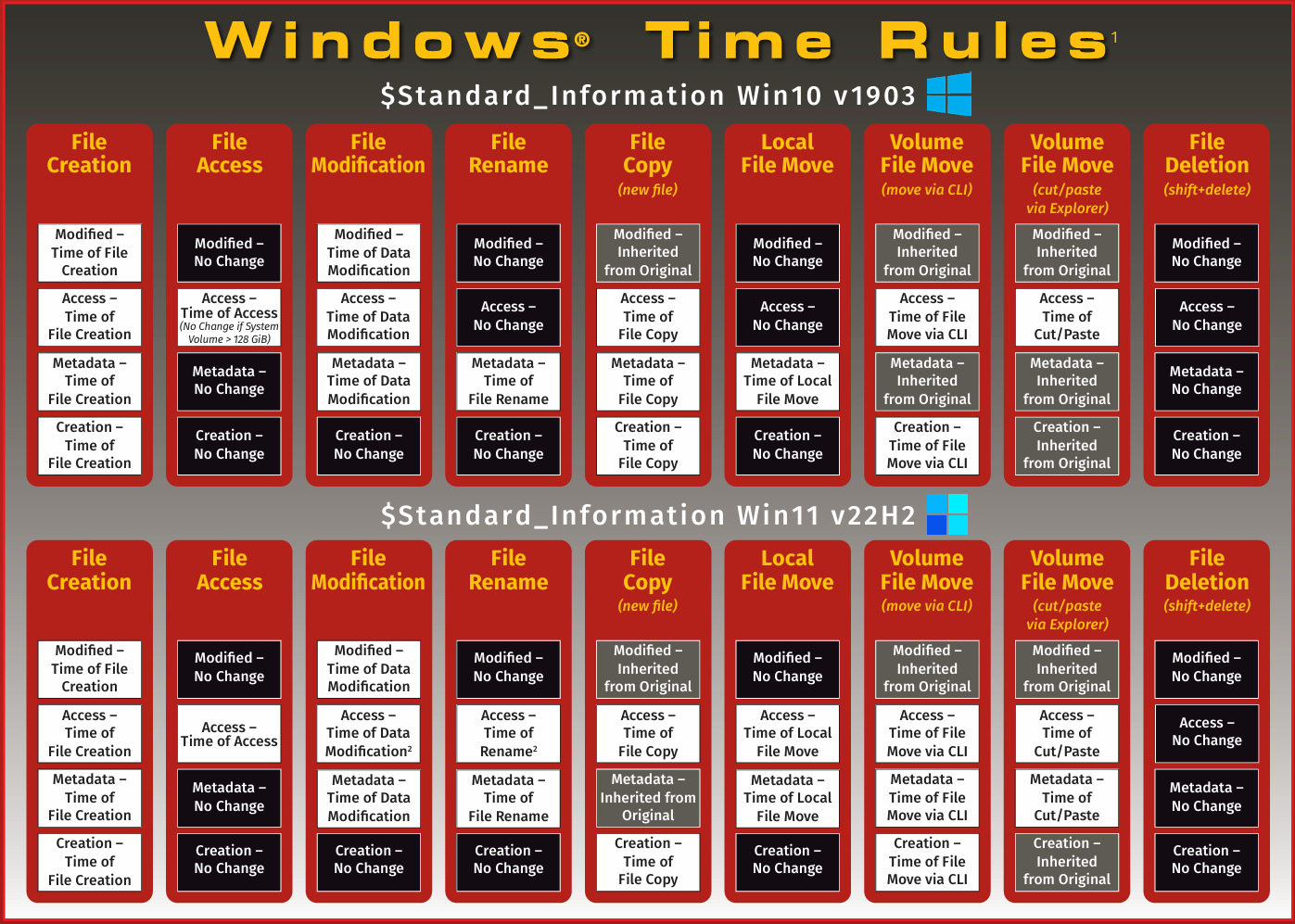
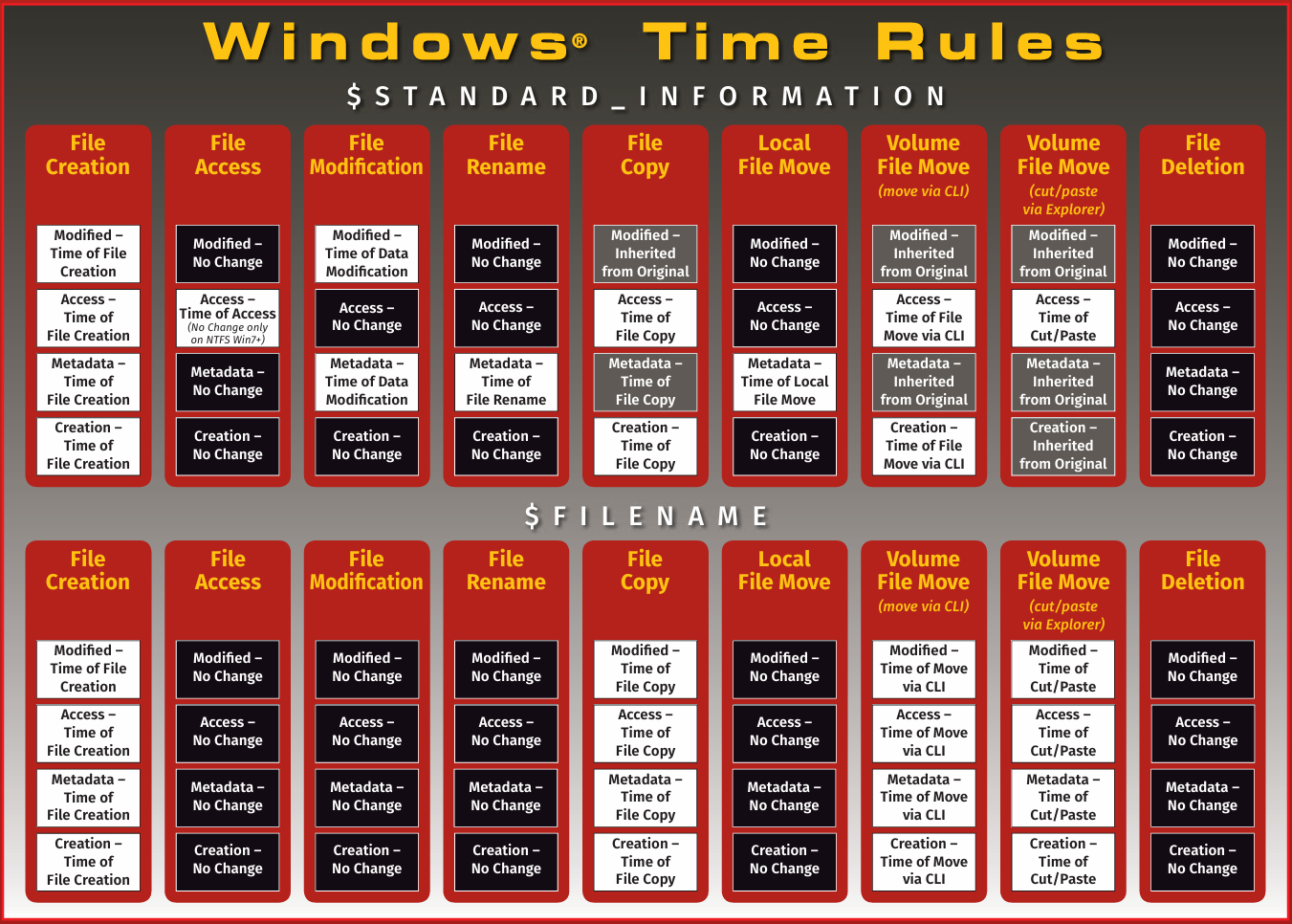
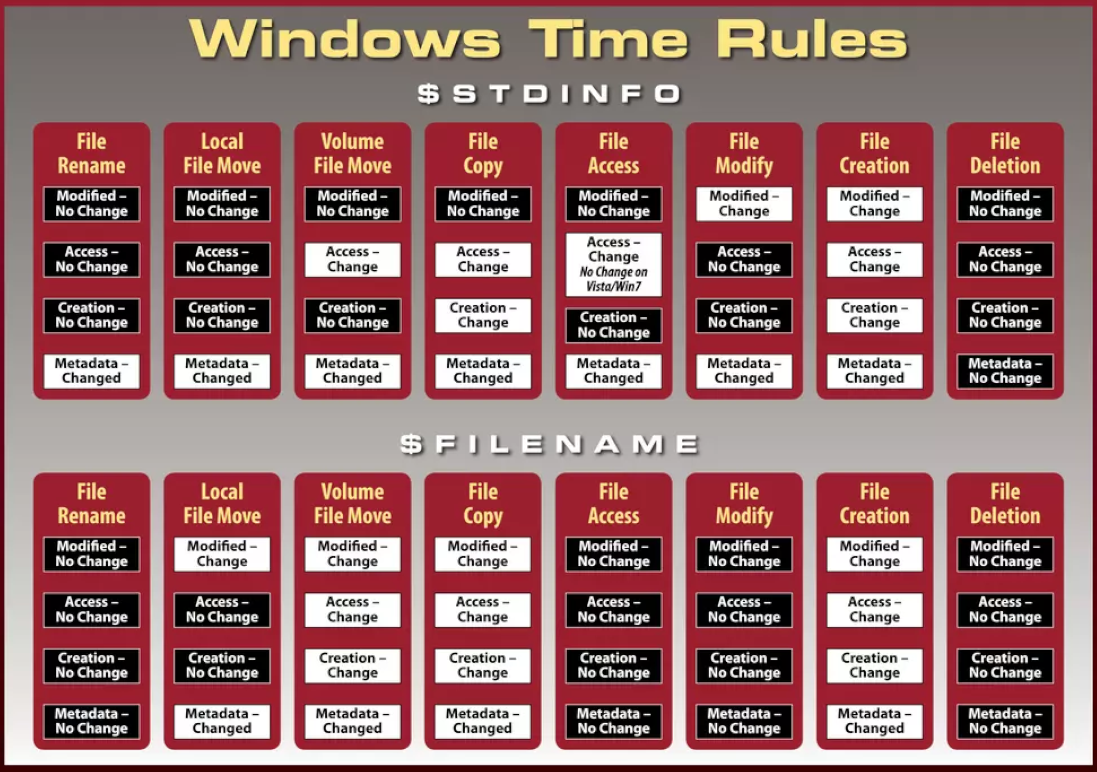
SANS Forensic Poster
SANS Windows Forensic Analysis Poster
2023 Edition
2018 Edition
2012 Edition
Reference
- Magnet Axiom blog - NTFS timestomping detection (2025)
- Mosse Institute - Windows File System Tunneling (2022)
- Eclectic Light - APFS timestamp interpretation (2025)
- University of Vienna - Time for Truth: NTFS Timestamps (2021)
- Josh Lemon - APFS timestamps blog (2023)
- ACM - Reconstructing Timelines from NTFS (2023)
- MacScripter - ditto and creation dates discussion
- Heiko Sieger - Accurate timestamps for image files (2023)
- Stack Overflow - macOS creation time preservation (2024)
- Velociraptor - NTFS $FILENAME modification via rename
- 13Cubed YouTube - Windows 11 timestamp changes (2023)
- Ponder the Bits - MACB timestamps from CLI (2020)
- Forensic Focus - MACB timestamps on Unix systems (2022)